FAX - Send Fax from Phone
Dingtone PhoneBusiness
4.41.72K Reviews
- Version
- 1.4.6
- Installs
- 500.00K
- Age Rating
- Everyone
Screenshots
Our Review of FAX - Send Fax from Phone
 Analysis by Appyee
I rarely think about faxing until someone asks for a signed form, a medical record, or paperwork for an office that still relies on fax. In that moment, being able to send a document from a phone can be genuinely useful. FAX - Send Fax from Phone is built around that occasional-but-urgent need, and its appeal is less about replacing every document workflow than about having an option ready when a fax machine is nowhere nearby.
Why the First Use Feels Convenient
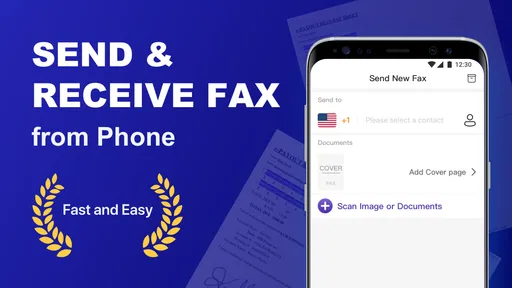
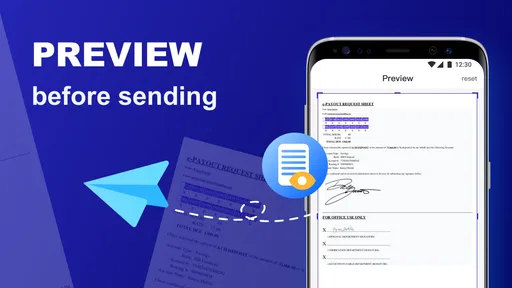
The first task is easy to understand: choose a document or capture one with the phone, enter a fax number, and send it. That direct route matters when I’m dealing with paperwork rather than exploring an app for fun. The interface is aimed at getting a fax out without making me learn a complicated process first.
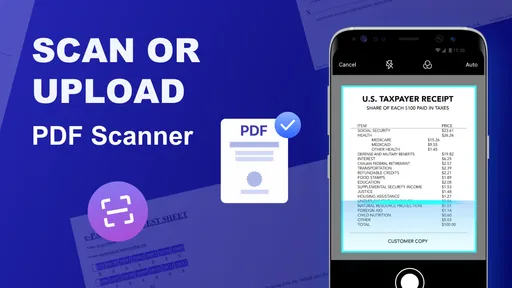
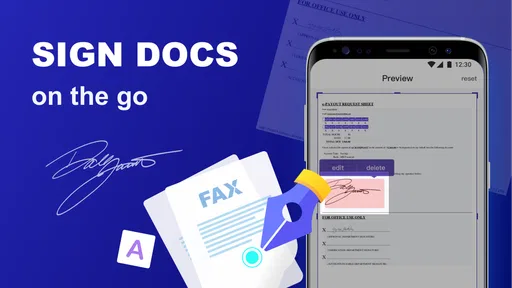
A realistic use might be receiving a form from a clinic while away from home, signing it on paper, then using a phone scan to send it back before an appointment. Another is a small business owner submitting a signed document while visiting a client. In both cases, the useful part is avoiding a trip to a print shop or an office fax machine. I would still check the resulting scan carefully: shadows, curled edges, handwriting, and faint printing can all make a phone-captured page harder to read at the other end.
The app is free to install, but that does not mean every fax is free. In-app purchases range from $3.99 to $99.99 per item, so I would look at the cost shown for the specific destination and page count before confirming a send. That distinction is important for someone who expects to fax often: occasional convenience may be worth paying for, while repeated multi-page sending deserves a cost comparison with other services.
What It Is Like to Keep Using It
Faxing is rarely a daily habit for most people, which makes this a practical tool to keep in reserve rather than an app I would expect to open constantly. Its month-to-month value depends on whether those one-off moments happen often enough to justify keeping it installed. If I only need to send a document once in a long while, I can use it when the need arises and decide later whether it still deserves space on my phone.
For a small office or someone handling recurring forms, the calculation is different. It helps to keep the original file in an orderly folder and give each scanned page a clear orientation before sending. That small bit of preparation can reduce the chance of choosing the wrong draft or submitting a page that is difficult to read. I would also keep a separate note of the recipient’s fax number and any required cover-page details rather than relying on memory when I’m in a hurry.
Compared with a traditional fax machine, sending from a phone is more convenient when I’m away from a desk and do not want to print a document first. Compared with emailing a PDF, though, faxing only makes sense when the recipient specifically requires it or cannot accept another format. Email is usually simpler for ordinary document sharing, while a nearby copy shop may be a better choice for a large batch, repeated high-volume work, or pages that need careful physical handling.
Small Checks That Make a Difference
Before sending anything important, I would verify the fax number from the recipient’s own paperwork or by contacting them directly. A wrong digit can send private information to the wrong place, and a successful transmission does not prove that the intended person has reviewed it. For sensitive forms, I would confirm the recipient is expecting the fax and ask how they want the pages arranged.
It is also worth treating the cover page as part of the document, not as decoration. A concise note identifying the intended recipient and the purpose of the fax can help an office route it correctly, but unnecessary personal details do not belong there. When sending several pages, I would check that the scan includes every page and that the order makes sense before paying to transmit it.
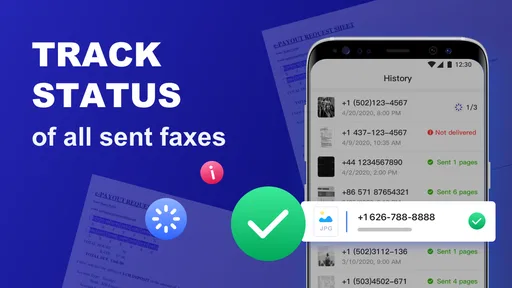
After sending, a status record can be useful when I need to follow up, but I would not treat a delivery indication as a substitute for confirmation from the office. If a deadline matters, I would call or email the recipient through an appropriate channel to make sure the pages arrived and are readable. That extra step is especially sensible for medical, legal, or financial documents.
Who Benefits—and Who May Prefer Another Method
This is most appealing to people who need to fax occasionally and want to do it without locating a machine: freelancers returning signed paperwork, families handling administrative forms, and travelers dealing with an unexpected request. The app is a business tool, but that does not mean it is only useful to companies. Its everyday value comes from making a relatively uncommon task possible when the usual equipment is not available.
I would be less enthusiastic if I needed a fax service every day, had a large document queue, or wanted a predictable ongoing expense without checking per-send costs. In those situations, a dedicated business fax service or a physical office setup may be easier to budget and manage. I would also skip faxing altogether when the recipient accepts a secure digital upload or email; using a fax simply because it is available adds an unnecessary step.
Maintenance, Costs, and the Point Where It Gets Old
The maintenance burden seems low in the ordinary sense: I do not need to keep a machine supplied with paper or toner. The more relevant upkeep is keeping the app available, checking that it remains compatible with my device, and making sure I have the document ready in a usable form. It is listed for Android with a minimum OS requirement of 7.0, and the current version is 1.4.4. The developer is Dingtone Phone.
Its potential source of fatigue is the gap between “free to install” and “free to send.” If I open the app only under pressure, then discover I need to review a purchase for the number of pages or destination, that extra decision can feel inconvenient. I would avoid waiting until the final minutes of a deadline to prepare a fax. Check the document, recipient number, and displayed charge early enough to choose another route if the cost or process is not suitable.
For a very occasional user, the app’s strongest long-term role may be as a contingency. I would keep it only if I have a realistic chance of needing mobile faxing again, and I would remove it if that need never returns. A tool does not have to become part of a daily routine to be worthwhile, but it should solve a concrete problem when called upon.
First Impressions and User Interface
Getting started with FAX - Send Fax from Phone is a breeze. The app is available for both Android and iOS, making it convenient for a broad audience. After downloading and installing it, I was greeted with a clean and intuitive interface. The design is straightforward, and everything is pretty much where you’d expect it to be. No steep learning curves here, which is always a plus in my book.
Once you open the app, you’re immediately presented with the option to start a new fax. You can either snap a photo of your document or upload a file directly from your phone. The app supports a variety of file formats including PDF, DOC, and JPG, which is quite handy.
Sending a Fax: As Simple as It Sounds?
Sending a fax using this app is as easy as pie. After selecting the document, you just enter the recipient’s fax number and hit send. The app even lets you add a cover page, which is a nice touch for keeping things professional.
During my test, I sent a few faxes to different numbers to see how well the app performed. I was pleasantly surprised by the speed and reliability. Every fax went through without a hitch, and I received confirmation notifications promptly.
One of the coolest features is the option to track your sent faxes. The app logs each fax, providing details like the date, time, and status of delivery. It's like having a little fax history in your pocket, which is perfect for keeping records.
What About the Costs?
Now, let’s talk about the big question: How much is this going to cost? The app operates on a credit-based system. You purchase credits, and each fax costs a certain number of credits depending on the destination and number of pages. While the app isn’t free, the cost is quite reasonable compared to traditional faxing methods. Plus, they offer packages that lower the cost per fax if you plan to send frequently.
Security Features
Security is a major concern when sending sensitive documents. Thankfully, the app provides strong encryption to keep your data safe during transmission. It’s reassuring to know that my documents aren’t floating around in cyberspace unprotected.
Additionally, the app doesn’t store your documents after they’ve been sent. This feature gives me peace of mind knowing that my sensitive information isn’t lingering on any servers longer than necessary.
Room for Improvement
While the app performs admirably, there are a few areas where it could improve. For instance, incorporating a cloud integration feature would be a game-changer. Imagine being able to pull documents directly from Google Drive or Dropbox! Also, while the interface is user-friendly, a dark mode option would be a nice touch for those who prefer a different aesthetic or are using the app in low-light environments.
Final Thoughts
All in all, the app is a reliable tool for anyone needing to send faxes on the go. It's simple, effective, and packed with features that make mobile faxing a breeze. Whether you're a frequent faxer or just need it for occasional use, this app is worth checking out. With its strong security measures, reasonable pricing, and user-friendly interface, it’s a solid choice for modern faxing needs.
So, if you find yourself in a bind without a fax machine in sight, give this app a whirl. It might just save the day. It has a 4.4 average from around 4,500 ratings, with more than 1,700 written reviews and over 500,000 installs. Rated for Everyone, it is free to download, with optional in-app purchases. Those figures suggest it has found an audience, though they do not change the practical question: whether you personally need to send faxes often enough for a phone-based option to be useful.
My lasting verdict is that this is a handy backup for the specific moments when fax is still the required channel. I would use it for a short, time-sensitive document after checking the scan, number, and cost, then confirm receipt if the paperwork matters. For routine sharing, I would choose email or a secure upload instead; for frequent or bulky fax jobs, I would compare dedicated services. That is the balance that makes the app worthwhile to me: convenient when the old workflow gets in the way, but not a reason to turn every document into a fax.
Verdict
Strengths of FAX - Send Fax from Phone
- Easy to use interface for quick faxing.
- Supports various file formats, including PDF.
- No physical fax machine needed.
- Receive notifications on fax status.
- Cloud integration for storage access.
Limitations of FAX - Send Fax from Phone
- Limited free faxes before subscription needed.
- Requires stable internet connection.
- May not support all international numbers.
- Some features locked behind paywall.
- No dedicated customer support chat.
Other Releases by Dingtone Phone
View All
Second Number for Call & Text
Social4.4
Similar Picks in This Category
View All
LinkedIn: Community & Network
LinkedIn3.8

Zoom Workplace
zoom.com4.1

Microsoft Teams
Microsoft Corporation4.6

Meta Business Suite
Meta Platforms, Inc.4.6

Webex Meetings
Cisco Systems, Inc.4.5

TeamViewer Remote Control
TeamViewer4.4
Frequently Asked Questions
How does FAX - Send Fax from Phone work?
FAX - Send Fax from Phone allows you to send faxes directly from your smartphone without needing a traditional fax machine. Simply take a photo of the document or upload a file from your device, enter the recipient's fax number, and send. The app converts your document into a fax format and transmits it over the internet.
Is FAX - Send Fax from Phone secure for sensitive documents?
Yes, FAX - Send Fax from Phone prioritizes security by using encryption protocols to protect your documents. This ensures that your sensitive information is transmitted securely. Always ensure you are using a secure network and keep the app updated to the latest version for optimal security features.
What file formats are supported by FAX - Send Fax from Phone?
The app supports a wide range of file formats including PDF, DOC, JPG, and PNG. This flexibility allows users to send various types of documents as faxes. You can either upload files directly from your phone or capture images using your camera to convert them for faxing.
Are there any costs associated with using FAX - Send Fax from Phone?
While the app may be free to download, sending faxes typically incurs a cost. The app offers different pricing plans or pay-per-fax options. Be sure to check the pricing details within the app to understand the costs involved, which may vary based on the number of pages or destination.
Can I receive faxes using FAX - Send Fax from Phone?
Currently, FAX - Send Fax from Phone focuses primarily on sending faxes. If receiving faxes is a feature you require, you may need to look for additional services or apps that offer this capability. Always check the app's latest updates or developer notes for any feature enhancements related to fax reception.
